Blog

  • The Evolution of Digital Project Management: From Folders to AI

    The Evolution of Digital Project Management: From Folders to AI

    Project management did not start with software. It started with folders, email chains, and hoping someone remembers the next step. That setup worked when teams were small and work moved slowly. It breaks the moment you have multiple projects, multiple stakeholders, and requests coming from everywhere.

    This guide explains the evolution of digital project management, from folders to AI. You will see what each era solved, what it broke, and what modern teams should look for now. If you are evaluating platforms, you will also see where Skarya.ai fits and why AI-native work management is becoming the new baseline.

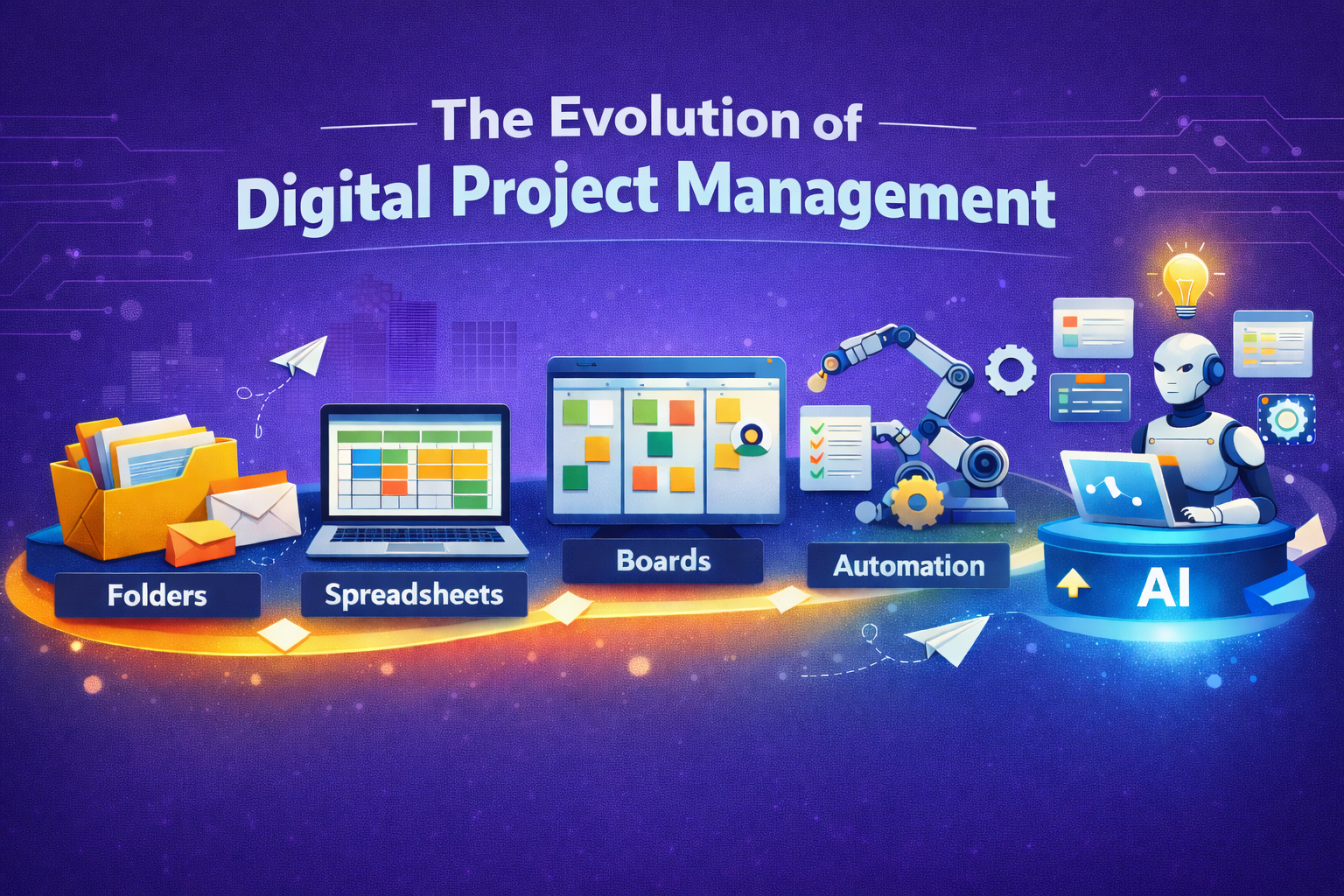
    Folders store work. Boards show work. AI-native systems run work.

    The Folder Era, Storage Pretending to Be Management

    Folders solved one job well, file storage. Teams could share documents, keep deliverables together, and build a simple archive.

    The problem is that storage is not management. Management needs ownership, deadlines, handoffs, and visibility.

    What worked

    • Shared access to files
    • Simple structure for deliverables
    • Familiar workflow for everyone

    What broke

    • Version confusion, final, final2, final_final
    • Updates buried in email or chat
    • No clear next step when work changes

    Example: A client request arrives by email, someone updates a doc, nobody assigns the follow up, the deadline slips quietly.

    Tip: If your “project system” cannot answer “who owns this” in 5 seconds, it is not a project system.

    The Spreadsheet Era, Tracking Plans Not Progress

    Spreadsheets were the next step because teams wanted structure. Owners, due dates, priorities, status. It felt like control.

    But spreadsheets rely on a fragile habit, manual updating. When work gets busy, the sheet becomes a record of intentions, not reality.

    Why teams used it

    • Fast to set up
    • Flexible
    • Easy to share and sort

    Why it failed at scale

    • Status is outdated the moment it is written
    • Handoffs are not enforced, they are just rows
    • Context lives elsewhere, in docs, DMs, meetings
    • Time tracking and delivery reporting get bolted on later

    Key takeaway: Spreadsheets list work. They do not move work.

    The Board Era, Visibility Arrives

    Boards changed project management because work became visible. Teams could see tasks, owners, and progress at a glance. This is where modern task management took off.

    Then the second wave hits, boards multiply. One for each team, each project, each client. Soon the same work shows up in three places, and nobody knows which one is the truth.

    The win

    • Clear ownership and due dates
    • Shared visibility
    • Better collaboration around tasks

    The new mess

    • Board sprawl and duplicated tasks
    • Work split across tools, docs in one place, time in another, updates in chat
    • Managers spend time chasing status instead of removing blockers

    Quick check: If you have to ask “which board is this in,” you already have tool fragmentation.

    The Workflow Era, Process Beats Memory

    Workflows and automation were the next leap. Teams stopped relying on reminders and started relying on systems. Intake, assign, approve, deliver. Repeat.

    Automation reduces admin, but many teams still feel stuck because the workflow lives in one tool while the real work lives across five.

    What automation fixed

    • Routing new work to the right owner
    • Triggering reminders and approvals
    • Standardising recurring processes
    • Reducing manual coordination

    Why teams still feel stuck

    • Tasks are separate from docs and decisions
    • Time tracking is disconnected from tasks
    • Reporting is still manual
    • Visibility breaks when tools do not talk

    Tip: Automation only works when the workflow and the work live together.

    The AI Era, Less Admin More Momentum
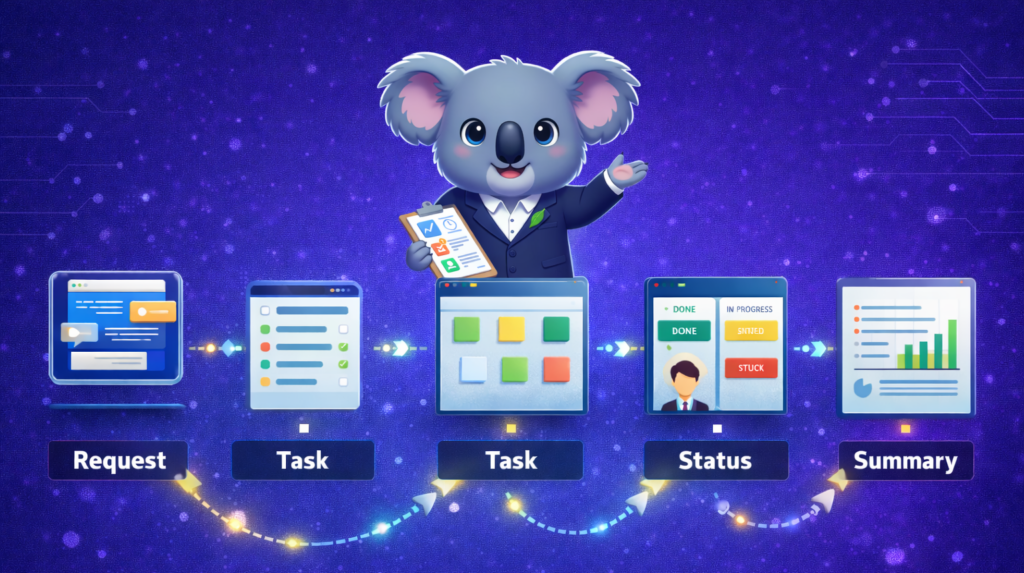
    AI is not here to replace project management. It is here to remove the time-wasting parts. Chasing updates, rewriting summaries, turning messy requests into structured tasks, and finding what is blocked.

    What AI project management actually does

    • Turns notes, messages, and requests into tasks with owners
    • Summarises progress without status meetings
    • Surfaces blockers and overdue work faster
    • Reduces reporting effort by pulling from real activity

    What AI will not do

    • Decide priorities for you
    • Resolve stakeholder conflict
    • Make trade-offs when timelines collide
    • Replace accountability

    Key takeaway: AI helps teams manage flow, not just tasks.

    What Modern Teams Need, A Quick Checklist

    If you relate to two or more of these, you have outgrown folders and boards alone.

    • “What is the status” is asked daily
    • Work stalls at handoffs, not effort
    • Requests arrive in email, chat, calls, and notes
    • Reporting takes hours and still feels wrong
    • Time tracking happens later, and nobody trusts it

    What to look for next

    • One place where tasks, docs, and decisions connect
    • Workflow automation that enforces handoffs
    • Built-in time tracking tied to tasks and projects
    • AI that summarises progress and structures work, without adding complexity

    Where Skarya.ai Fits in the Evolution

    Skarya.ai is built for the AI stage of work management. Not just visibility, but execution. The goal is simple, keep work clear, connected, and moving.

    If you want the high level view, start here: Skarya product overview.
    If you want to see the platform capabilities in detail, go here: Skarya features.

    One place for work, not five tools

    Skarya brings projects, documentation, workflows, collaboration, and time tracking into a single system, so context stays attached to execution.

    Workflows, time tracking, and AI in one system

    Skarya helps teams reduce admin with:

    • structured intake, so requests do not disappear
    • workflow automation, so handoffs do not stall
    • time tracking where the work lives, so reporting is cleaner
    • Kobi AI assistance, so summaries and task creation take minutes, not hours

    If you want a concrete example for a service based team, see how it applies to agencies here: Skarya for creative agencies.

    The best project management tool is the one your team actually uses, because it reduces effort, not adds steps.


    FAQs

    What is AI project management

    AI project management uses AI to reduce manual admin, like turning messy inputs into tasks, summarising updates, and surfacing blockers.

    Will AI replace project managers

    No. It replaces busywork, not decisions. Humans still own priorities, trade-offs, and stakeholder alignment.

    What should we automate first

    Start with these three, in order:

    1. Work intake, so requests do not vanish
    2. Handoffs, so tasks do not stall
    3. Status updates, so meetings shrink

    The evolution of digital project management follows a pattern. Teams moved from storing work, to listing work, to seeing work, to running work. AI is the next step because it cuts admin and keeps momentum without constant chasing.

    If your team is stitching tools together to stay organised, explore Skarya.ai and see what it looks like when workflows, time tracking, and AI live in one system. Start with the product overview and then review the features to match it to your workflow
  • SaaS vs IaaS vs PaaS: The Clear Guide for Scaling Teams.

    SaaS vs IaaS vs PaaS: The Clear Guide for Scaling Teams.

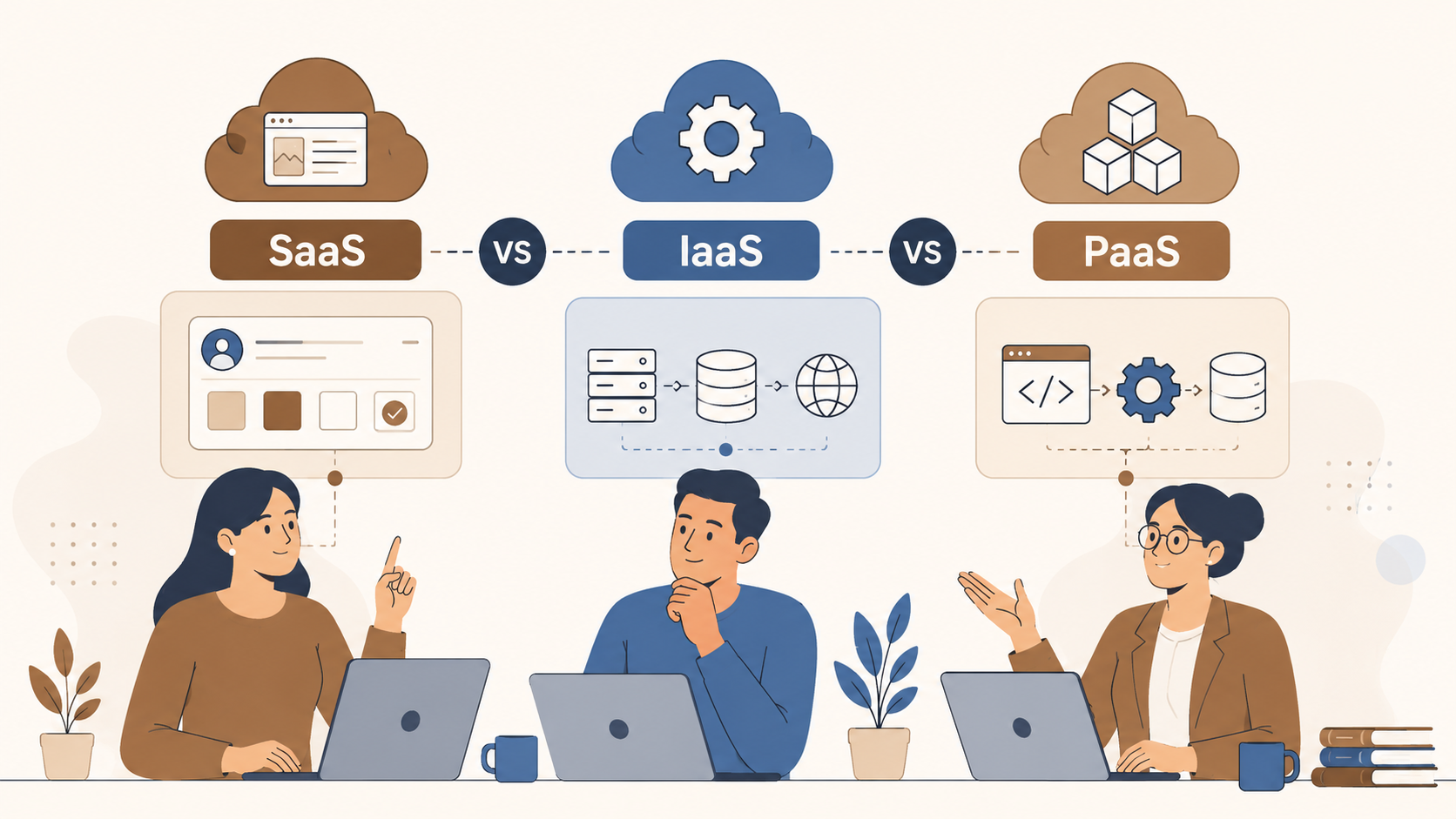
    SaaS, IaaS, and PaaS all run in the cloud, but they are not interchangeable. Pick the wrong model and you will either pay for control you do not need, or lose flexibility you actually require. This guide explains all three using one simple analogy, real examples, and a quick framework to choose what fits your business today.

    The Gym Membership Analogy: Understanding Cloud Models Simply

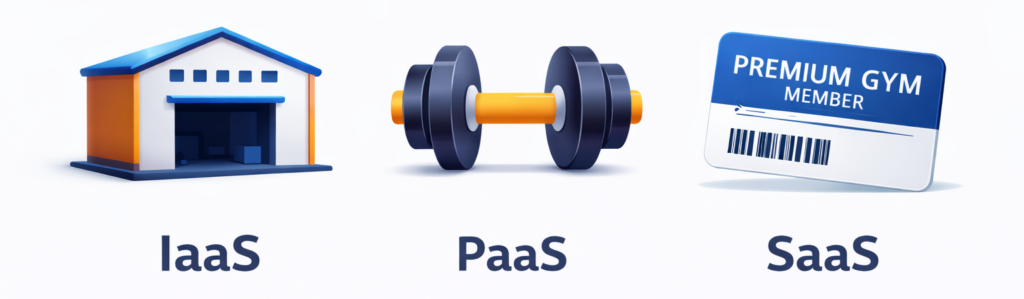
    Before diving into definitions, here is one clean way to think about all three cloud models. Imagine you want to get fit.

    • IaaS: You buy an empty warehouse. You install your own gym equipment, hire trainers, set your own hours, and manage everything yourself. Total control, but total responsibility.
    • PaaS: You rent a fully equipped gym space. The treadmills, weights, and showers are already there. You just bring your own workout plan and do the training.
    • SaaS: You join a premium gym. Everything is set up, maintained, and upgraded for you. You just show up, swipe your card, and work out.

    One analogy. Three models. Keep reading to go deeper on each.

    Responsibility shortcut before we go deeper:

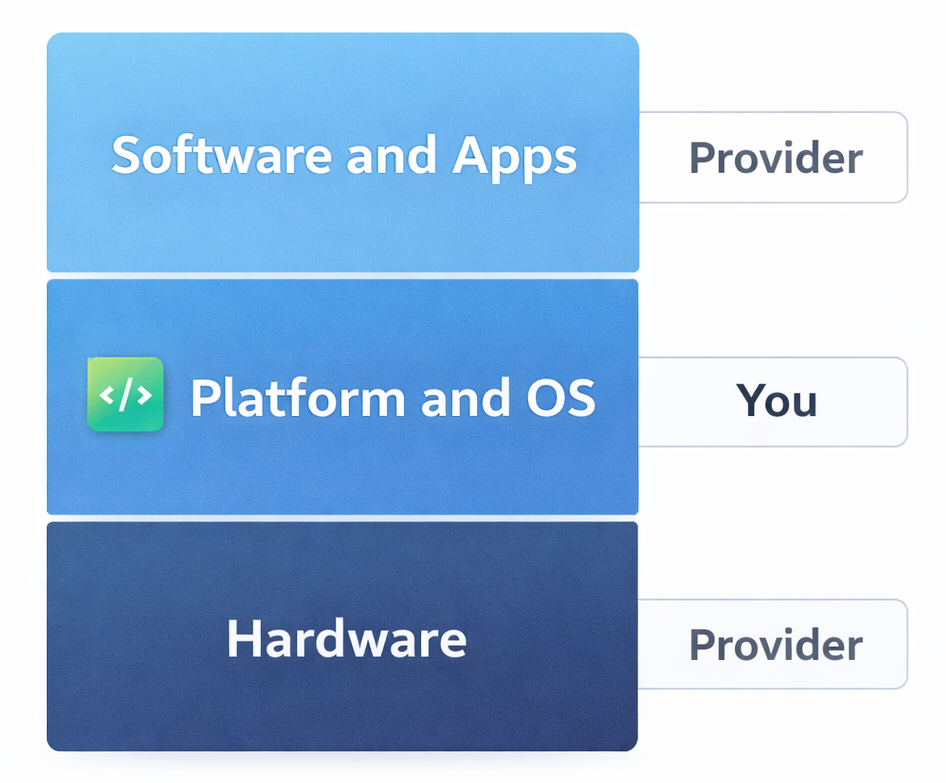
    • SaaS: Provider runs almost everything. You just use the software.
    • PaaS: Provider runs the platform. You write and ship the code.
    • IaaS: Provider runs the hardware. You manage most of the stack above it.

    Keep this in mind as you read each section. It is the fastest way to remember which model owns what.

    What Is SaaS (Software as a Service)?

    SaaS is cloud-delivered software that users access through a browser or app. No installation, no server management, no IT headaches. The provider handles everything under the hood while you focus on using the product.

    How SaaS Works

    Think of SaaS like a Netflix subscription. Netflix manages the servers, updates the platform, fixes bugs, and adds new content. You just log in and watch. SaaS software works the same way. The vendor runs the tech, you run your business. You typically pay a monthly or annual subscription fee, and the software is accessible from any device with an internet connection.

    Real-World SaaS Examples (Including skarya.ai)

    • Skarya.ai – Work management and workflow automation platform
    • Slack – Team communication and collaboration
    • Salesforce – Customer relationship management (CRM)
    • Google Workspace – Email, docs, and productivity suite
    • Zoom – Video conferencing and virtual meetings
    • HubSpot – Marketing, sales, and service automation

    Pros and Cons of SaaS

    • Ready to use in minutes with no setup required
    • Automatic updates, patches, and new features
    • Accessible from any device, anywhere in the world
    • Predictable, subscription-based pricing
    • No need for in-house IT or infrastructure teams
    • Limited ability to deeply customize the software
    • Data lives on the vendor’s servers
    • Ongoing subscription costs accumulate over time
    • Risk of vendor lock-in if you rely heavily on one platform

    Best for: Teams and businesses that want powerful software without the technical overhead, from solo founders to enterprise departments.

    What Is IaaS (Infrastructure as a Service)?

    IaaS gives you virtualized computing resources over the internet, including servers, storage, and networking, without owning physical hardware. You rent the foundation and build everything on top of it yourself.

    The provider manages the physical hardware and virtualization layer. Everything above that, including operating systems, databases, middleware, applications, and security, is your responsibility. That means maximum flexibility, but it also means your team carries the full management burden.

    Real-World IaaS Examples

    • Amazon Web Services (AWS EC2) – Virtual servers on demand
    • Microsoft Azure Virtual Machines – Cloud infrastructure for enterprise workloads
    • Google Cloud Platform (GCP) – Scalable compute and storage
    • IBM Cloud – Hybrid cloud infrastructure solutions

    Pros and Cons of IaaS

    • Virtually unlimited flexibility and control
    • Scale compute resources up or down instantly
    • Pay only for what you use
    • Supports any operating system, language, or stack
    • Requires a skilled DevOps or IT team to manage
    • Security, compliance, and maintenance fall on your shoulders
    • Costs can spiral without careful monitoring
    • High learning curve for non-technical teams

    Best for: Large enterprises, tech companies, and teams with dedicated infrastructure engineers who need full control over their environment.

    What Is PaaS (Platform as a Service)?

    PaaS provides a fully managed environment including operating system, runtime, databases, and development tools, so your team can build, test, and deploy applications without managing the underlying infrastructure.

    Developers write code and ship applications. The platform handles everything beneath that layer. The result is faster development cycles and less time spent on infrastructure decisions.

    Real-World PaaS Examples

    • Heroku – App deployment platform loved by developers
    • Google App Engine – Scalable app hosting with zero server management
    • Microsoft Azure App Service – Enterprise app development platform
    • AWS Elastic Beanstalk – Easy app deployment on AWS infrastructure
    • Red Hat OpenShift – Container-based PaaS for enterprise teams

    Pros and Cons of PaaS

    • Dramatically faster app development and deployment
    • No infrastructure management required
    • Built-in scalability as user demand grows
    • Ideal for agile development and DevOps workflows
    • Less control over underlying infrastructure
    • May not support every programming language or framework
    • Vendor lock-in risk if you build deep platform dependencies
    • Data security and compliance depend on the provider

    Best for: Software development teams, startups building custom applications, and enterprises modernizing legacy software.

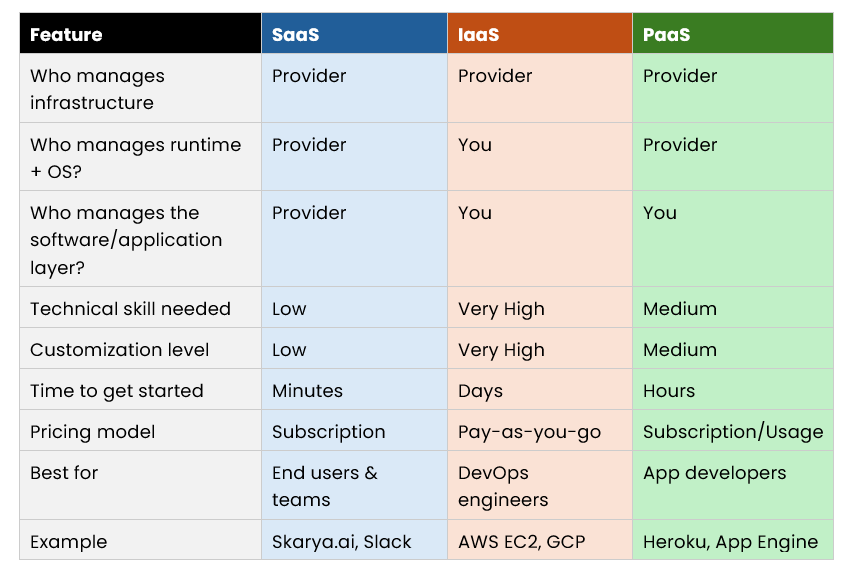
    SaaS vs IaaS vs PaaS: Side-by-Side Comparison

    How to Choose the Right Cloud Model

    Choose SaaS if:

    • You need software that works immediately with zero setup
    • Your team is non-technical or has no dedicated IT staff
    • You want predictable monthly costs and automatic updates
    • You are managing communication, projects, CRM, or operations

    Choose IaaS if:

    • You have a skilled DevOps or infrastructure team in place
    • You need full control over your environment and configurations
    • You are running complex, high-performance or custom workloads
    • You want to build and manage your own complete tech stack

    Choose PaaS if:

    • You are a developer or have an active development team
    • You want to build and ship a custom application quickly
    • You do not want to manage servers but need more control than SaaS offers
    • You are working in an agile or continuous deployment environment

    Pro Tip: Most scaling businesses use a combination of all three. SaaS for daily operations, PaaS for building internal tools, and IaaS for heavy data workloads. The key is knowing which model to apply where.

    Why skarya.ai Fits the SaaS Model (Without the Complexity)

    skarya.ai is a SaaS work management platform. You log in and start using it right away. No servers to manage, no infrastructure decisions, and no setup overhead.

    It is a fit for teams who want a single place to run day-to-day work and reduce the constant follow-up of where is this at?

    What teams typically use it for:

    • Keeping tasks, projects, and updates in one place
    • Turning repeatable work into simple, consistent workflows
    • Improving visibility across the team without adding more meetings

    Security features are designed for team access and control, including roles and permissions, so you can manage who sees and does what without needing an IT team to configure it.

    It integrates with popular tools your team already uses, and helpful summaries and prompts are built in to speed up execution rather than slow it down.

    If you want the speed and simplicity of SaaS for operations, skarya.ai shows what log in and get moving looks like, without heavy setup or admin.


    Frequently Asked Questions

    What is the simplest way to explain SaaS, IaaS, and PaaS?

    Use the gym analogy. IaaS is buying an empty warehouse and setting up your own gym. PaaS is renting a fully equipped gym space and bringing your own workout plan. SaaS is joining a gym where everything is already handled for you.

    Is skarya.ai a SaaS product?

    Yes. skarya.ai is a cloud-based SaaS platform. There is nothing to install or configure. You subscribe, log in, and start managing work from any device right away.

    Can small businesses use SaaS platforms like skarya.ai?

    Absolutely. SaaS is especially well-suited for small businesses because it removes the need for in-house IT, offers predictable pricing, and scales as your team grows.

    What is the biggest mistake businesses make when choosing a cloud model?

    Choosing based on price alone. IaaS can look cheaper upfront but engineering time, security management, and ongoing maintenance often make SaaS the more cost-effective choice for most teams.

    Can you use more than one cloud model at the same time?

    Yes, and most scaling companies do. A common setup is SaaS for daily operations, PaaS for internal app development, and IaaS for large-scale data infrastructure.

    Conclusion

    SaaS, IaaS, and PaaS are not competing options. They are different tools built for different jobs. SaaS gives you ready-to-use software with zero setup overhead. IaaS gives technical teams full control over infrastructure. PaaS gives developers a managed environment to build and ship faster.

    For most teams focused on operations and execution, SaaS is the fastest path to getting work done, and skarya.ai is a straightforward example of what a practical, no-overhead SaaS platform looks like in the real world.

    Stop managing tools and start managing outcomes. Deploy skarya.ai today.
  • AI Productivity in 2026: A Smarter Workflow System

    AI Productivity in 2026: A Smarter Workflow System

    What if you could get two hours back every day without working longer or hiring more staff? In 2026, AI productivity tools are helping teams cut busywork, reduce follow ups, and move work forward faster.
    This guide explains what AI productivity means, what actually drives results, and how Skarya.ai helps teams build workflows that save time every week.

    Quick takeaway: AI productivity improves when AI supports execution inside workflows, not when it lives in a separate chat tab.

    What Is AI Productivity? (And Why It Matters in 2026)

    AI productivity is using artificial intelligence to reduce repetitive work like drafting, summarising, organising, and routing, so you can spend more time on decisions, delivery, and customer outcomes.
    Teams lose huge time to “work about work” like updates, meetings, and chasing status. Asana’s research breaks this down clearly. Read it here.

    AI will not replace people. People who use AI well will outpace people who do not.

    The shift from task management to execution support

    Older tools helped you organise work. AI productivity tools help you execute work. That includes turning messy requests into structured tasks, summarising progress, drafting updates, and prompting follow ups when work stalls.

    The Four Key Pillars of AI Productivity

    AI productivity is not one feature. It is a set of capabilities that reduce friction across the full workflow.

    1) Intelligent task automation

    This is the fastest win. AI can reduce repeat tasks that drain time and attention.

    • Auto routing: send requests to the right person based on type and priority
    • Task drafting: create structured tasks from short inputs or messages
    • Follow ups: trigger reminders and escalation when deadlines slip
      Key takeaway: automate steps that are predictable, repeatable, and easy to validate.

    2) AI powered content and communication

    Writing is a hidden time sink. AI can produce strong first drafts for emails, proposals, reports, and internal updates. The best results happen when the AI has context from the task, the workflow stage, and the relevant documentation.

    3) Smart summarisation and research

    Instead of reading long threads or scanning transcripts, AI can surface what matters.

    • What changed
    • What is blocked
    • What needs a decision
    • What happens next

    4) Workflow orchestration

    The biggest productivity gains come when work flows end-to-end with fewer handoffs.
    Simple model: Intake → Triage → Assign → Execute → Approve → Report
    Key takeaway: AI productivity compounds when your tasks, docs, and updates live in one system.

    How Skarya.ai Supercharges AI Productivity

    Skarya.ai is built for teams that want execution to feel calm, visible, and controlled. It helps you centralise work and reduce admin without adding complexity.

    What makes Skarya.ai different

    • No code workflows: build automations without developers
    • Context aware assistance: AI support improves when it can see the work and the workflow stage
    • Connected work and documentation: keep SOPs and docs close to tasks
    • Visibility: reduce status chasing with clear ownership and progress

    Explore: Skarya.ai platform overview, Pricing

    Who Skarya.ai is built for

    • Freelancers and solopreneurs: keep delivery, tracking, and docs in one place
    • Small to mid size teams: reduce reporting overhead and coordination work
    • Operations led teams: standardise intake and execution across repeatable processes

    Real world use cases

    1. Sales: draft follow ups and keep pipeline tasks consistent
    2. Content: turn briefs into task plans and drafts faster
    3. Operations: generate weekly summaries from live work, not manual reporting
    4. Customer success: triage requests and speed up internal handoffs

    How to Build an AI Productivity System That Actually Works

    Using AI tools is easy. Getting repeatable results requires a simple system.

    Step 1: Audit your time for 48 hours

    Track what you do for two days. Label each task as strategic, relational, or repetitive. The repetitive list becomes your automation target list.

    Step 2: Pick one high leverage automation

    Start with the task that takes the most time and provides the least unique value. For many teams, that is status updates, meeting prep, routine emails, or request triage.

    Step 3: Build the workflow in Skarya.ai

    Define inputs, rules, and outputs.

    • Inputs: request type, priority, due date expectation, context
    • Rules: ownership, routing, approvals, escalation triggers
    • Outputs: tasks, summaries, drafts, reminders, dashboards

    If you want the bigger picture on where genAI creates productivity value across work, McKinsey’s overview is useful. Read it here.

    Step 4: Measure, iterate, expand

    Track cycle time, overdue work, and time spent on updates. Improve one workflow at a time. Once the first workflow is stable, expand to the next.

    Common Pitfalls to Avoid

    • Automating broken processes: fix the workflow first, then automate it
    • Skipping review: keep a human review step for external facing content
    • Tool sprawl: too many tools increases coordination work
    • Low buy in: position AI as removing busywork, not replacing people
    • Privacy blind spots: be clear about what data can be used where

    Frequently Asked Questions

    What is AI productivity?

    AI productivity is using AI to reduce repetitive tasks and coordination work so individuals and teams can deliver more outcomes in less time.

    How does Skarya.ai improve productivity?

    Skarya.ai helps by centralising tasks, workflows, and documentation so work stays visible, ownership is clear, and routine coordination can be automated. Learn more at Skarya.ai.

    Is AI productivity only about writing faster?

    No. Writing is one part of it. The bigger gains come from workflow execution like intake, routing, approvals, follow ups, and summaries.

    What is the difference between AI productivity and task management?

    Task management helps you track work. AI productivity helps you reduce admin and move work forward by supporting execution and automation inside workflows.

    Conclusion: Start Small, Then Compound the Gains

    In 2026, AI productivity is not about using more tools. It is about building workflows that reduce busywork and protect focus time. When intake is consistent and ownership is clear, AI can support execution safely and reliably.
    If you want a practical place to run those workflows, explore Skarya.ai and start with one workflow this week. The time savings compound fast once the system is in place.

    Try Skarya.ai free: Get started here

  • The Best AI Tool for Small Business Owners in Australia

    The Best AI Tool for Small Business Owners in Australia

    You did not start a business to chase status updates and rewrite the same brief three times. But if you run a small team in Australia, that is probably where a lot of your week goes.

    Finding the best AI tool for small business owner operations is not about adding another app. It is about removing the friction that eats your day. In this guide, you will learn exactly what to look for, why most tools fall short, and how the Skarya.ai work management tool helps Australian SMBs turn incoming work into clear tasks, connected documentation, and real visibility without hiring a project manager or running endless meetings.

    Why Australian SMBs Struggle with Work Management

    Work lives in too many places

    For most small businesses in Australia, work arrives from everywhere, a client email, a WhatsApp message, a Slack ping, a sticky note from a Friday meeting. Each channel has its own format, its own urgency, and its own risk of getting buried.

    When requests live in inboxes and DMs rather than a shared system, two things happen: work gets dropped, and the loudest person wins. Neither is good for your business or your team.

    The hidden cost of chasing updates

    Australian Bureau of Statistics data consistently shows that small businesses cite admin burden as one of their top growth barriers. And the biggest chunk of that admin is not invoicing or compliance, it is the invisible work of figuring out what is happening, who owns it, and whether it is on track.

    Every check-in message, every “just following up” email, and every unplanned stand-up is a symptom of a system that is not working. The right AI tool fixes the system, not just the symptom.

    What Is an AI Work Management Tool (And Why It Beats Regular AI)?

    Not all AI tools are the same. Here is a quick way to tell them apart:

    • Chat AI (like ChatGPT or Claude): Great for writing, brainstorming, and answering questions. It does not manage your work, it helps you think.
    • Automation tools (like Zapier): Move data between apps when a trigger fires. Useful, but not intelligent about context or ownership.
    • AI work management tools (like Skarya.ai): Live inside your workflow. They help you capture, organise, assign, and track work, and use AI to reduce the manual effort of doing all of that.

    If you want fewer dropped balls and less time spent on coordination, you need AI that operates inside the workflow, not beside it.

    How to Choose the Best AI Tool for Small Business Owner Workflows

    Use this checklist before you commit to any platform. It will save you from a tool that looks great in a demo and fails in week two.

    1. Capture work the moment it arrives

    Your intake will never come from one channel. The best AI tool for small business owner teams standardises how work enters the system, regardless of whether it comes from a client email, an internal request, or a compliance deadline. If every request has to be manually reformatted before it can become a task, you have already lost the efficiency gain.

    2. Turn vague requests into structured tasks

    Real-world work requests sound like: “Can you handle this today?” or “Client wants changes.” A strong AI tool helps shape those inputs into tasks your team can actually execute. The minimum a task needs:

    • A clear definition of done
    • An owner (and backup owner where relevant)
    • A due date and priority
    • Supporting context- links, files, client details, constraints

    3. Keep SOPs and docs connected to execution

    Most businesses have process documentation. Most teams cannot find it when they need it. When SOPs live in a shared drive and tasks live in a separate tool, the gap between intention and execution widens under pressure. Look for a tool that keeps your documented processes attached to the workflows they support.

    4. Visibility without weekly status meetings

    If you need a meeting to find out what is happening, your tool is not doing enough. Good visibility means:

    • A live view of what is in progress, blocked, and overdue
    • Workload distribution across your team
    • Summaries that do not require manual input

    5. Fast adoption for a small team

    Complex tools punish small teams. A practical rule: if a new staff member needs a training deck and a week of hand-holding to use the tool daily, it is too heavy. The best AI tools for small businesses are opinionated enough to guide good habits and simple enough that adoption is not a project in itself.

    Skarya.ai Work Management Tool: Built for How Small Businesses Actually Run

    Most platforms bolt AI onto an existing task manager and call it intelligent. Skarya.ai takes a different approach, it is built around how work actually flows in small teams, where context gets lost across handoffs and documentation is always three steps behind execution.

    One place for tasks, docs, and workflows

    Skarya brings tasks, documentation, workflows, and collaboration into a single system. That means context stays attached to execution. When someone picks up a task, they can see the relevant SOPs, prior decisions, and client notes without switching tools or asking a colleague who already left for the day.

    For Australian service businesses, agencies, consultants, bookkeepers, healthcare admin teams, this is the difference between consistent delivery and inconsistent delivery that depends on who is in the office.

    Kobi-AI That Works Inside Your Workflow

    Kobi is the AI assistant built into Skarya. It is not a chatbot you query separately. It operates inside the workflow to:

    • Draft structured tasks from rough, incomplete inputs
    • Summarise progress and updates without manual reporting
    • Keep workflows and documentation aligned with what is actually happening
    • Suggest next steps and flag when something looks blocked

    That is the practical difference between AI that saves you time every week and AI that impresses you once in a demo.

    Real Use Cases for Australian Service Businesses

    Client work and approvals: Client requests arrive with missing details and moving deadlines. Skarya helps you capture every request consistently, assign it with clear ownership, and keep approvals visible so nothing stalls mid-project.

    Internal operations: IT access, onboarding, equipment, policy questions, all the internal requests that normally land in someone’s inbox and disappear. Standardise intake, route to the right person, track to completion.

    Weekly delivery planning: Many small teams run informal weekly sprints without calling them that. Skarya makes planning clean, assign the week, see the load, spot blockers before they become fires.

    Billable time tracking: If you sell time, time tracking needs to connect to tasks. Skarya helps you see what is billable and what is internal overhead, protecting your margin without end-of-month chaos.

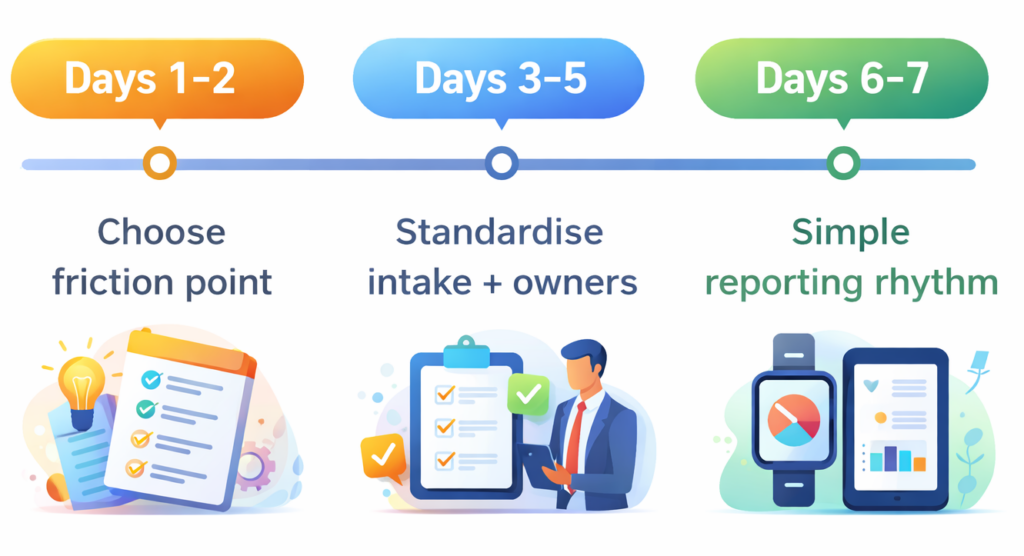
    How to Roll Out Skarya in 7 Days (Without Overthinking It

    You do not need a six-week implementation. You need one workflow running end to end. Here is how to get there in a week.

    Days 1–2: Choose one friction point

    Pick the workflow that causes the most daily pain. Client requests? Onboarding? Weekly delivery? Internal approvals? Start with exactly one. Getting one workflow working well is worth more than having five workflows set up badly.

    Days 3–5: Standardise intake and ownership

    Define the minimum information required to start work on that workflow. Set default owners. Add simple priority rules. Keep it lightweight, you will improve it based on real use, not imagined scenarios.

    Days 6–7: Create a simple reporting rhythm

    Run a short weekly review focused on three questions: What is blocked? What is overdue? What needs a decision? Use Skarya’s views and summaries to answer those questions without pulling people into a meeting. Once the rhythm is consistent, expand to the next workflow.

    Frequently Asked Questions

    What is the best AI tool for a small business owner in Australia?

    The best AI tool depends on your biggest operational pain point. If your problem is work falling through the cracks, unclear ownership, and too much time chasing updates, an AI work management tool like Skarya.ai is the right category. It is purpose-built for small teams that need clarity without complexity.

    Is Skarya.ai suitable for non-technical teams?

    Yes. Skarya is designed for fast adoption by small, non-technical teams. You do not need a system administrator or a long onboarding process to get value from it.

    How is Skarya different from tools like Asana or Monday?

    Asana and Monday are task management platforms that have added some AI features. Skarya is built with AI at the core and specifically integrates tasks, documentation, and workflows into a single system, reducing tool switching and keeping context attached to execution.

    Can I use Skarya.ai for client-facing work?

    Yes. Skarya supports client delivery workflows, including task assignment, approvals, and status visibility. It is well-suited for agencies, consultants, and professional service firms.

    How long does it take to get started?

    Most small teams can have a core workflow running in one to two days. The 7-day rollout framework above gives you a practical path to getting started without overthinking the setup.

    Stop Chasing Updates. Start Running a Better System.

    The best AI tool for small business owners in Australia is not the one with the most features , it is the one your team actually uses every day. It captures work before it disappears, turns vague requests into clear tasks, keeps documentation connected to execution, and gives you visibility without constant meetings.

    The Skarya.ai work management tool is built around that reality. It is practical, fast to adopt, and designed for small Australian teams that need to deliver consistently without adding complexity.

    Ready to cut the admin and run a tighter operation? Start your free trial on Skarya.ai and get your first workflow running this week.

  • Meetings vs. Async Updates: The Time Sink Draining Your Team

    Meetings vs. Async Updates: The Time Sink Draining Your Team

    Most teams don’t have a meeting problem.

    They have a clarity problem and meetings are what they reach for when clarity is missing.

    If you’ve ever sat through a 45-minute status call that could have been a two-line update, you know exactly what this costs. Not just the time on the calendar. The broken focus, the interrupted deep work, the three follow-up Slack messages that happen after the meeting because nothing was actually decided.

    This is the quiet drain behind low output and high frustration. And it almost always starts with one mistake: treating meetings and async updates like they’re interchangeable.

    They’re not. For ops leads and team managers, knowing which to use and when is the line between a team that moves fast and a team that just feels busy.

    The “Default to Meeting” Trap: Why Visibility Isn’t the Same as Progress

    When teams default to meetings for everything, three predictable things happen:

    1. Focus time disappears: Deep work gets carved into 30-minute windows between calls. Nothing substantial gets finished.
    2. The meeting becomes the work: People prepare for the meeting instead of doing the actual job. Updates are performed, not shared.
    3. Decisions don’t stick: Without a written record, what was “decided” in the room becomes three different things by Thursday.

    The fix isn’t fewer meetings for the sake of it. The fix is using the right communication mode for the right situation.

    Meetings vs. Async: The Fire Alarm vs. The Bulletin Board

    Here’s the clearest way to think about the difference without starting a passive-aggressive calendar war.

    Meeting = The Fire Alarm (Real-Time Response)

    A meeting is a synchronous tool for situations that genuinely require immediate, collaborative thinking.

    • It works when: The problem is ambiguous, emotionally charged, or requires rapid back-and-forth to resolve.
    • It answers: What do we do right now, together?

    Async Update = The Bulletin Board (Documented Progress)

    An async update is a structured, time-independent communication that keeps work visible without demanding everyone’s attention at once.

    • It works when: The information is factual, the decision is already made, or the recipient needs context, not a conversation.
    • It answers: Here’s where things stand. No response needed unless something’s wrong.

    The Bottom Line: A fire alarm makes sense when there’s a fire. If you’re pulling it to share the weekly sales numbers, you’re training people to ignore it.

    Comparison Table: Real-Time vs. Documented

    CategoryMeeting (Synchronous)Async Update (Documented)
    Best ForAmbiguity, conflict, ideationStatus, decisions, FYIs
    FormatLive call, video, in-personWritten update, recorded loom, task comment
    Answers“What do we decide together?”“What happened and what’s next?”
    Success MetricDecision qualityClarity & time saved
    In Skarya.aiTagged discussion threadsTask updates & status routing

    The Before/After: Calendar Chaos vs. A System That Runs

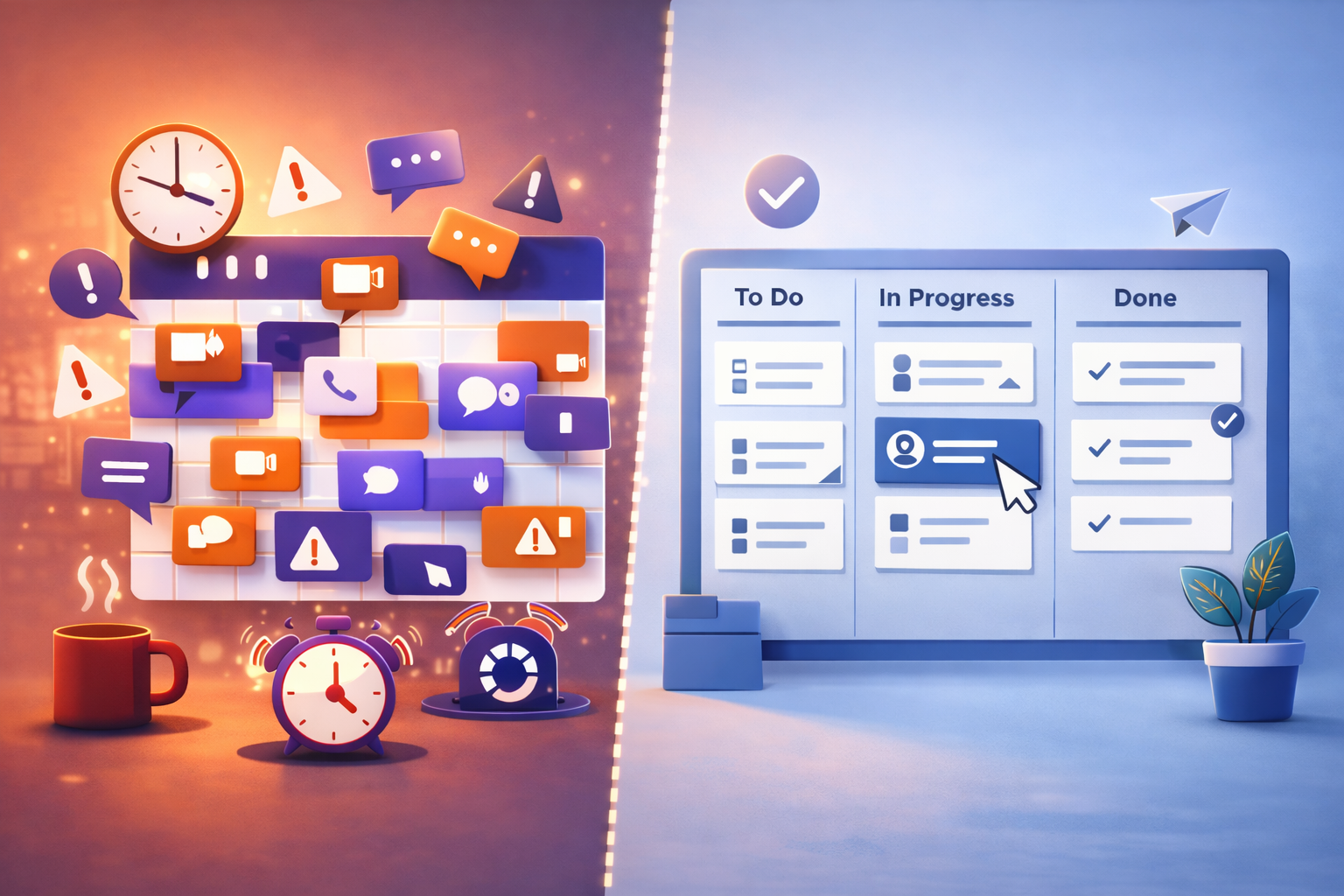
    Before: The Meeting-Heavy “Workflow”

    Monday kicks off with a 9am all-hands. Tuesday has three syncs back to back. By Wednesday, everyone is behind on actual work and scheduling a Thursday meeting to talk about why. Updates live in someone’s memory. Decisions get re-litigated because no one wrote them down. The person who missed the call asks for a recap, which takes another 20 minutes.

    Every meeting without a clear outcome is a tax on the next one.

    After: A Skarya System That Defaults to Async

    A project update gets posted directly to the task in Skarya. The relevant stakeholders are notified automatically. Status is visible on the board without anyone asking. If a blocker is flagged, it routes to the right person with context already attached. Meetings happen when a decision genuinely needs a room, not because it’s Tuesday.

    This is the shift: Communication becomes documented, searchable, and attached to the work, not floating in someone’s calendar history.

    3 Mistakes That Keep Teams Stuck in Meeting Culture

    1. Using Meetings as a Comfort Blanket

    When teams lack a reliable system for tracking work, meetings become the only way to feel informed. The meeting isn’t the problem, the missing system is.

    The Fix: Build a visible work system first. When everyone can see status in real-time, the “quick sync” becomes unnecessary.

    2. Async Without Structure

    Async fails when updates are vague, inconsistent, or buried in Slack threads no one can find later. “Just send a message” is not an async strategy.

    The Fix: Standardize what an update looks like: owner, status, blockers, next step. Templates remove the thinking so people actually use them.

    3. No Record of Decisions

    Meetings make decisions. Async updates document them. When neither is written down, the decision doesn’t exist, it just gets made again next week.

    The Fix: Every meeting that produces a decision should produce a written record attached to the relevant task. Not in a separate doc. Not in Slack. On the work itself.

    Solution: Build a Communication System with Skarya.ai

    Skarya was built for the moment teams realize their communication is everywhere and their work is nowhere.

    1. Attach updates to tasks, not channels: Every status change, comment, and decision lives on the task it belongs to. Context doesn’t get lost between tools.
    2. Standardize updates with Smart Forms: Ensure every status update arrives with the right fields, owner, progress, blockers, next step, automatically.
    3. Make status visible without asking: Skarya boards show real-time progress. No one needs to call a meeting to find out where things stand.
    4. Flag blockers automatically: If a task hits a blockers stage, Skarya routes the alert to the right person with full context already attached.

    A Fast Reality Check

    Ask these five questions:

    • Could this meeting have been a written update?
    • Do decisions made in meetings get documented anywhere?
    • Can your team see project status without asking someone?
    • Do async updates in your team have a consistent format?
    • Is your calendar a reflection of your priorities or your gaps?

    If you answered “no” more than once, you don’t need another meeting to talk about it. You need a system that makes the meeting optional.

    Stop defaulting to the calendar. Start free on Skarya.ai and build a communication system your team can actually trust.

  • Client Portal Best Practices: What to Show Clients, What to Keep Internal

    Client Portal Best Practices: What to Show Clients, What to Keep Internal

    Client Portal Best Practices: What to Show Clients, What to Keep Internal

    Transparency Without the Noise

    A client portal that creates questions has already failed.

    A project client portal should reduce check-ins, speed up approvals, and make delivery feel steady. Not become “just another place to check” that clients forget until something feels late.

    The best client portal software does one job well: it gives clients confidence that work is moving, without exposing the messy middle of internal brainstorming, micro-tasks, and half-formed notes.

    Why Client Portals Often Fail

    Most portals fail because of the Goldilocks problem.

    They show too little, so clients can’t tell what’s happening and email becomes the real source of truth again.

    Or they show too much, and clients start scanning every detail, misreading internal signals, and unintentionally turning your workflow into a group chat.

    Here’s what that looks like.

    Too little: the portal that still triggers “just checking in”

    The portal shows one vague label like “In progress.” Files live in email. Dates are fuzzy. There’s no clear next step.

    So the client does the only thing that makes sense. They message you.

    “Hey, quick update?”

    Your team replies in email, then forgets to update the portal because the real work is already happening somewhere else. Now you’re maintaining two realities, and neither stays clean.

    Too much: the portal that turns clients into managers

    The portal shows every internal task and every internal comment.

    The client sees 147 tasks and assumes progress is slow. They see “Blocked” on a subtask and assume delivery is at risk. They read a rough internal note and treat it like a decision.

    Then the micromanagement starts.

    “Why is this still open?”
    “Do we really need this task?”
    “Can you reprioritise these three items today?”

    That’s not a “difficult client” problem. It’s a portal design problem. The fix isn’t more transparency. It’s better curation.

    A portal should pass the One-Minute Test: can a client understand what’s happening in under sixty seconds?

    What Clients Need to See in a Project Client Portal

    If you want client portal best practices in one line, it’s this.

    Give the client clarity, not raw activity.

    Status in human language

    Avoid internal labels like “In QA” or “Sprint 4.” To a client, those sound like system errors.

    Use plain language that communicates outcome and timing.

    Instead of: Drafting v2 (70%)
    Write: Draft ready for your review on Friday

    Instead of: Waiting on dependency
    Write: Paused until brand assets arrive. Next update Monday

    A good status line reads like a calm message from a competent team lead.

    The next action (and who owns it)

    Every project needs one obvious next step.

    If the next step is on the client, say it clearly and make it easy.

    If it’s on your team, tell them what happens next and when they’ll hear from you.

    When clients can see the next action instantly, you cut the two most common portal messages: “Any update?” and “What do you need from me?”

    Real dates only

    A portal with stale dates is worse than no portal at all. It signals drift.

    Only show dates you intend to maintain. If the timeline shifts, update the portal first, then notify the client. That order trains everyone to trust the portal as the source of truth, not the latest email.

    If a date is tentative, label it as Estimated. Once a date appears in an agency client portal, many clients treat it like a contract.

    One clean home for files

    Clients should never have to hunt through threads for Final_V3_REALLY_FINAL.pdf.

    Your portal should contain:

    • the latest file, clearly labelled
    • a simple archive of previous versions
    • a short “what changed” note

    That last part is underrated. Even one sentence like “Updated the hero copy and adjusted the pricing layout” prevents confusion and speeds review.

    Approvals that record themselves

    Approvals are where projects stall.

    Make approvals lightweight and traceable. When a client approves, the portal should automatically record who approved, when they approved, and what exactly they approved.

    This isn’t just a workflow detail. It prevents later disagreement about what was signed off, and it makes scope conversations cleaner because there’s a visible decision trail.

    What to Keep Internal

    Transparency is not the same as exposure.

    A portal is client-facing. Your internal workspace is where the messy middle belongs.

    Internal brainstorming and rough drafts

    Clients don’t need the ugly first pass or internal debate.

    They hired you for the outcome. Share options when options are ready. Share decisions when decisions are made. Keep the struggle private.

    Micro-tasks and kitchen prep

    A long list of tiny tasks makes progress feel slow, even when momentum is strong.

    Clients should see milestones, not the prep work. Milestones communicate progress. Micro-tasks communicate friction.

    Sensitive operations

    Avoid exposing internal workload, staffing notes, utilisation, or anything margin-adjacent.

    Even when harmless, it invites interpretation and tension. A project client portal should communicate delivery, not capacity.

    Unverified timelines

    If you’re not sure, don’t publish it as a hard date.

    Use Estimated, Pending approval, or Dependent on input so expectations stay realistic without being vague.

    The Portal-First Communication Shift

    A portal won’t work if your team still sends 500-word updates by email.

    Clients follow the path of least resistance, and email is familiar. Retraining doesn’t require a big announcement. It requires consistency.

    Use one simple rule.

    Send short messages that point back to the portal.

    Example:
    “Hey [Name], the latest draft is ready. Review and approve it in the portal here: [Link].”

    Email becomes the notification layer. The portal becomes the place the project lives.

    The 5-Minute Weekly Rhythm That Makes Portals Stick

    “Five minutes a week” is not a nice-to-have. It’s the difference between a portal that builds trust and a portal that becomes a ghost town.

    Pick a consistent day and time. Friday is ideal because it prevents weekend uncertainty and resets expectations for Monday.

    Here’s what a real Friday update looks like.

    Friday update template

    Status (one sentence): Where things are, in plain language.
    This week (two bullets): What moved that the client cares about.
    Next (two bullets): What happens next and when.
    Client action (one line): If you need something, make it explicit.
    Risks (one line): If there are none, write “No risks this week.”

    Mock example

    Status: Draft landing page is ready for your review.

    This week:

    • Finalised page structure and rewrote the headline section
    • Added pricing layout and updated CTA copy

    Next:

    • Apply your feedback Monday and share v2 by Wednesday
    • Prepare the final assets pack for handoff Friday

    Client action: Please approve the headline and pricing section by Tuesday 3pm.

    Risks: No risks this week.

    That’s short, specific, and calming. It tells the truth without dumping internal noise, and it makes the portal worth opening.

    Common Client Portal Mistakes to Avoid

    1. Treating the portal like a dump of everything
    2. Leaving dates stale and hoping nobody notices
    3. Storing files in email while claiming the portal is the source of truth
    4. Hiding the next action so clients have to ask
    5. Writing updates that sound like internal status codes

    Fix those five, and most portal issues disappear.

    Where Skarya Fits

    Skarya is built for the split reality most service teams live in.

    Your team gets a private workspace for tasks, notes, and internal coordination. Clients get a clean portal view with only what they need: status, next actions, key dates, files, and approvals.

    Because the portal connects to the actual work, updates don’t require duplication. The portal stays current without becoming another admin job.

    Quick checklist

    Before inviting a client into your portal, make sure:

    • Status is written in client language
    • The next action is visible and owned
    • Dates are real and maintained
    • Files live in one place with version clarity
    • Approvals are tracked automatically
    • Internal noise stays internal
  • What Is Work Management? A Simple, Practical Guide for Teams

    What Is Work Management? A Simple, Practical Guide for Teams

    Work gets messy in a very specific way. Not because teams don’t care, but because work arrives from everywhere, priorities change midweek, and nobody can see the full picture without opening ten tabs. Work management is the system that brings clarity back.

    What is work management?

    Work management is the process of organising, assigning, tracking, and improving all the work a team does, including daily tasks, ongoing operations, and time-bound projects. It makes work visible, ownership clear, and progress easy to follow without constant status chasing.

    Work management, task management, and project management

    Task management focuses on individual to-dos. Project management focuses on delivering a defined outcome with a timeline. Work management includes both, plus the operational work around them such as requests, approvals, recurring work, handoffs, and documentation, so the entire system runs consistently.

    What work management includes

    A solid work management setup usually has a single place where tasks live with clear owners, a simple way to prioritise, and a workflow that shows how work moves from new to done. It also keeps collaboration and files tied to the work so context doesn’t disappear into chats. Most importantly, it provides visibility so progress is obvious without building manual reports or scheduling meetings just to find out what’s happening.

    What work management looks like in real life

    Most teams run work management as a loop. Work arrives through a request, an idea, or a recurring process. The team triages it by priority and assigns an owner. The work moves through execution steps, then review or approval if needed. After delivery, the team improves the system by removing bottlenecks, clarifying steps, or automating repetitive handoffs. When that loop is consistent, teams deliver faster with less stress.

    Common work management problems and how to avoid them

    The most common issue is tool sprawl: tasks in one place, docs in another, approvals in email, and updates in chat. That forces teams to copy, paste, and re-explain work. Another issue is unclear priority, where the loudest request wins and important work gets delayed. Teams also lose time when requests arrive in random formats, which creates back-and-forth just to collect basic details. Visibility becomes manual too, where someone builds weekly updates that are outdated as soon as they’re shared. The practical fix is to standardise intake, keep workflows simple, and rely on live progress instead of manual reporting.

    What to look for in work management software

    If you’re choosing work management software, focus on what reduces friction. Look for fast task capture, flexible views like list and board, simple workflows, collaboration in context, and reporting that updates from live work. If you’re a service team, time tracking is often worth prioritising. Integrations matter as well, but only when they remove steps rather than add complexity.

    Where Skarya fits

    Skarya.ai is one work management platform built to help teams plan, track, and deliver work in one place without heavy setup. It brings together tasks and projects, workflow structure, documentation, collaboration, and timesheets so teams don’t have to juggle disconnected tools. Skarya also includes an AI assistant called Kobi that helps speed up structured task creation, summaries, and documentation drafting, which reduces admin and keeps teams focused on delivery.

    A simple way to start work management without overhauling everything

    Start with one workflow that causes friction, like onboarding, customer requests, content production, internal approvals, or recurring ops. Standardise how work comes in using a short template or form. Define three to five workflow steps. Run everything through one system for two weeks and aim for consistency rather than perfection. After two weeks, improve one thing: clarify priority rules, tighten the workflow, or automate a handoff. That’s how work management becomes real and sticks.

    FAQ

    What is work management in simple terms?
    Work management is how a team organises work so everyone knows what’s being done, who owns it, what’s next, and when it’s due.

    Is work management only for large teams?
    No. Smaller teams often benefit the most because time lost to confusion and status chasing hurts more when headcount is limited.

    Do I need Agile or Scrum for work management?
    Not necessarily. Many teams get more value from clear ownership, a simple workflow, and consistent prioritisation than from adopting a full methodology.

    What’s the biggest sign our work management is broken?
    If your team can’t answer what the most important thing to finish this week is without a meeting, your system lacks visibility.

    What should work management software include?
    At minimum: tasks with owners, clear workflows, collaboration in context, priority and due dates, and reporting that reflects real-time progress.

    Can work management include documentation and SOPs?
    Yes. Documentation stays useful when it’s connected to the workflows and tasks it supports, so it stays current.

    How does Skarya help with work management?
    Skarya.ai helps teams keep tasks, workflows, docs, collaboration, and timesheets connected in one workspace, with AI assistance from Kobi to reduce admin and speed up planning and updates.

  • How Startups Can Manage Projects Without Enterprise-Level Complexity

    How Startups Can Manage Projects Without Enterprise-Level Complexity

    Early-stage startups don’t fail because founders can’t plan.
    They fail because they fall into the Process Trap.

    It starts innocently. A tool meant to “add structure” becomes a system that demands structure before you have the time, headcount, or patience to maintain it.

    Here’s what that actually costs.

    If a five-person team loses just two hours a week to tool management, that’s ten hours gone. More than a full workday. Every single week.

    That’s a shipping tax. Lean project management is how you stop paying it.

    Founder tip: If your PM tool needs a “how to use this” Loom for new hires, it’s already too complex.

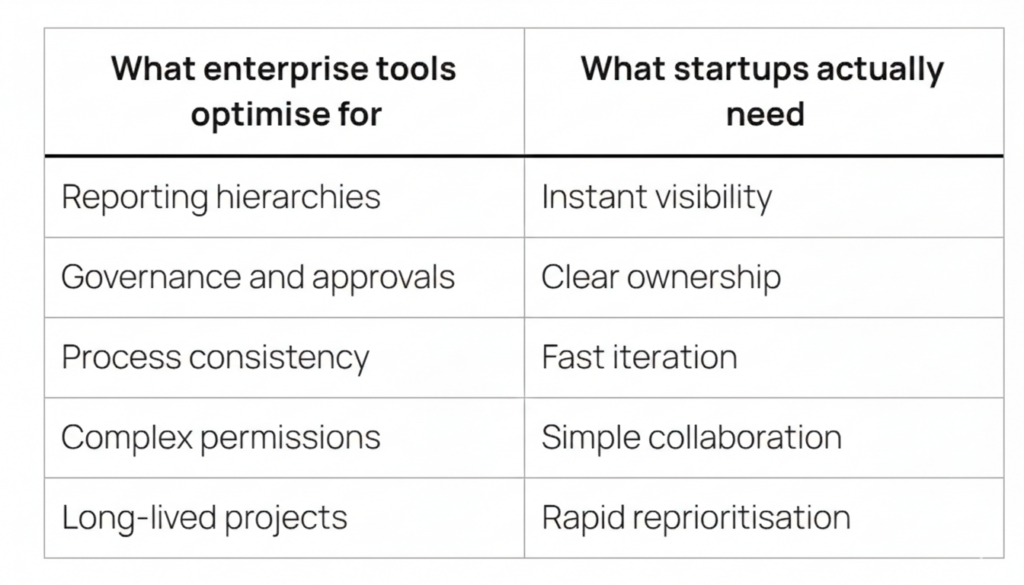
    Why Enterprise Tools Don’t Work for Startups

    Founders often reach for enterprise tools because they feel safe. “Enterprise-grade” sounds like “future-proof.”

    In practice, it usually means interruptions.

    Every mandatory field in a heavyweight system is a cognitive break. It pulls someone out of the work to satisfy the tool. It looks like this.

    • Assigning a task requires filling in status, priority, labels, sprint, story points, and a custom field nobody remembers creating
    • Updating progress becomes a ritual instead of a natural by-product of doing the work
    • The tool becomes a second job that someone has to manage

    Most enterprise setups also quietly assume something startups don’t have. A dedicated admin.

    Jira is excellent in large environments. But it often comes with a hidden cost. A Jira Admin. Startups don’t have admins. They have founders who should be talking to customers, shipping product, and making the next two hires.

    The mismatch isn’t about quality. It’s about timing.

    What Lean Project Management Actually Looks Like

    Lean project management isn’t fewer features. It’s fewer obstacles.

    In a startup, alignment happens fast. In Slack. Over coffee. In a quick call. Your tool shouldn’t create alignment. It should capture it with near-zero friction.

    Tasks in early teams are often ephemeral. Today’s plan is tomorrow’s context. A good lightweight PM tool handles pivots naturally, without broken dependencies, stale backlogs, or weeks of cleanup.

    The goal isn’t perfect planning. It’s fast alignment that stays visible.

    What to Actually Look For in a Lightweight PM Tool

    Here’s the simplest filter that works.

    The 60-Second Rule
    If a new hire can’t join your workspace and move a task card within 60 seconds, the tool is too heavy. Everything else is secondary.

    Beyond that, a simple PM tool for startups should deliver the basics exceptionally well.

    Minimal setup, immediate clarity
    Create a project, add tasks, assign ownership, done. No templates required. No configuration checklist.

    Execution-first design
    In startups, the “how” is often decided inside the task itself. Comments become documentation. The tool should keep discussion and execution together so context doesn’t leak across apps.

    One place for work
    If tasks live in one place, docs in another, and updates somewhere else, momentum dies in the gaps. Connected work reduces mental load and missed handoffs.

    Visibility without micromanagement
    You should see what’s moving and what’s stuck without chasing anyone for updates.

    Founder tip: The best system is the one you can ignore most of the day and still understand in 10 seconds.

    The Jira Trade-Off Power vs Timing

    Jira is the right tool for large teams. Think 500 plus people, strict compliance needs, and long-running programmes. In that environment, it earns its complexity.

    For early-stage teams, the risk is premature scaling.

    Adopting a heavyweight PM system too early is like hiring a CFO before you have revenue. It might be the right call eventually. Right now, it creates process debt.

    Early teams don’t need dependency graphs, permission matrices, or multi-layer reporting. They need speed, clarity, and flexibility, and they need it today.

    How Skarya Fits the Startup Reality

    Skarya is built for teams that want structure without rigidity. Not more process. Just a cleaner flow.

    Kanban boards that make work visible instantly
    What’s in progress, what’s next, what’s blocked, at a glance. No setup marathon. No training session required.

    Built-in timesheets that sit alongside your tasks
    This is the part most startup tools ignore. Tracking time shouldn’t mean switching tools, rebuilding context, or dreading Friday afternoon catch-ups.

    It matters more than founders expect, especially when you’re billing clients, preparing for audits, or making an R&D tax claim. Skarya gives you a clean, automatic record of where time actually went, without adding another process to maintain.

    No admin overhead. No bloat. Just the clarity a small team needs to stay focused and move fast.

    Start Simple. Scale When You’re Ready.

    The best project management system for a startup is the one that gets out of the way.

    Enterprise-level complexity can wait. Execution can’t.

    Set up your first Skarya board in 30 seconds and get your team’s focus back where it belongs.

    Try Skarya free →

  • Kanban vs Gantt vs List View in Project Management: Which Is Best for Your Team?

    Kanban vs Gantt vs List View in Project Management: Which Is Best for Your Team?

    The Context Switch Tax Is Real. And It’s Stealing Your Mornings.

    It starts the same way every day.

    You open a spreadsheet.
    Then a board.
    Then a timeline.
    Then Slack pings. Again.

    You click, scroll, search, squint, re-click, and somehow you’re ten minutes deep… and still not sure what the team is actually doing.

    That’s the Context Switch Tax.

    Not the fancy productivity kind. The annoying kind. The kind that makes your brain feel like a browser with 37 tabs open and one of them is playing music but you can’t find which one.

    Most teams don’t need “more tools.” They need fewer places where work can hide.

    And here’s the part that trips people up. Teams don’t switch views because they love variety. They switch because each view answers a different question.

    List view tells you what exists.
    Kanban tells you what’s moving.
    Gantt tells you what’s going to slip.

    The problem is most software treats those views like three different worlds. So you end up doing manual copy-paste therapy to keep them aligned.

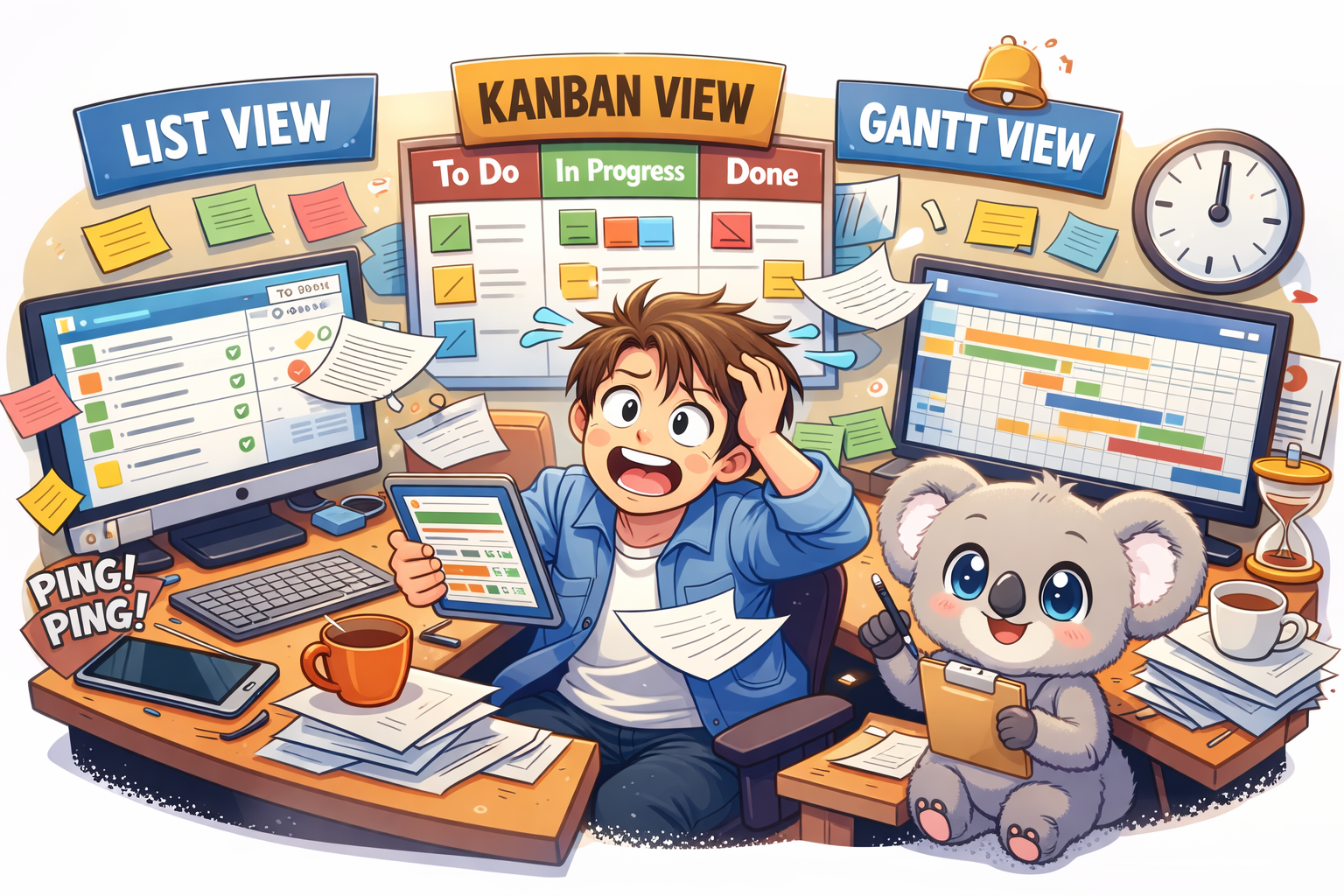
    That’s why Skarya.ai exists. It gives you List, Kanban, and Gantt in one place, all looking at the same live work. No weird syncing. No “wait why is this different here?”

    And Kobi is right there with you, doing the boring parts you don’t want to do.

    Let’s break it down.

    List View in Project Management: The “Get Your Head Straight” View

    What It is

    List view is the simplest format. Rows. Columns. Owners. Dates. Status.

    It’s not glamorous. It’s necessary.

    It’s where tasks should land when they first show up. New client request. Bug report. Random “can you do this today?” message from someone who doesn’t understand your calendar.

    If your system doesn’t have a strong list layer, everything else turns into noise.

    When It Works Best

    List view is best for planning and cleanup.

    It’s the view you open when you’re trying to answer questions like:
    What’s overdue?
    What’s unassigned?
    What’s been sitting there for two weeks pretending it’s “in progress”?

    It’s also where you do the real work of project management: taking messy requests and turning them into something a team can actually execute.

    How Kobi Helps

    In Skarya’s List view, you can type a rough task title and move on.

    Kobi doesn’t.

    Kobi fills in the annoying stuff. The description. The acceptance criteria. The “what does done look like” part that everyone forgets until QA screams.

    So instead of writing a mini essay for every task, you write the title, and Kobi drafts the rest like a teammate who actually pays attention.


    Kanban View in Project Management: The “What’s Stuck?” View

    What It is

    Kanban is the board. Cards moving through columns like:
    To Do
    In Progress
    Review
    Done

    It’s the view teams live in day to day because it tells the truth fast.

    You can see work moving. Or not moving. Which is usually the real story.

    When It Works Best

    Kanban is best when flow matters more than deadlines.

    If your daily standup sounds like:
    “What’s blocked?”
    “Who’s waiting on approval?”
    “Why is review a graveyard again?”

    You need a board.

    Kanban is also great for handoffs. Designer finishes, dev starts. Dev finishes, QA starts. QA finishes, launch starts. It makes those transitions visible so work doesn’t rot in someone’s private checklist.

    And yes, it also exposes the uncomfortable stuff.

    If your Review column has 14 cards and Done has two, you don’t have a productivity problem. You have a bottleneck problem.

    How Kobi Helps

    Boards get messy when people don’t update context.

    Kobi fixes that.

    You can ask Kobi something like:
    “What’s blocking Review this week?”

    And Kobi will look across the cards, pull the patterns, and give you a clean summary you can paste straight into standup notes.

    No manual digging. No detective work. No opening every card like you’re searching for clues in a crime scene.

    Gantt View in Project Management: The “Stakeholders Want a Screenshot” View

    What It Is

    Gantt view is the timeline. Tasks stretched across dates. Dependencies connected with lines.

    It’s what you use when timing actually matters, and one delay can ruin the rest of the plan.

    Stakeholders love Gantt charts because they want a timeline they can screenshot for a slide deck. That’s not an insult. It’s just how reporting works.

    When It Works Best

    Gantt is best when deadlines and dependencies are load-bearing.

    If one task slips and three others tumble behind it, you need to see that domino effect early, not two days before launch.

    It’s also the clearest way to answer:
    Are we still on track?

    Not with vibes. With dates.

    How Kobi Helps

    Here’s the thing about timelines.

    They go stale. Fast.

    Someone moves a deadline. Someone forgets to update dependencies. Suddenly your timeline is a lie, and everyone’s making decisions based on the lie.

    In Skarya, when a date shifts, Kobi does the annoying maintenance work.

    Kobi recalculates downstream dependencies and alerts the people who are affected.

    Not in a dramatic way. Just a helpful “heads up, this change impacts you” way. Like the teammate who actually updates the plan instead of saying “yeah I’ll do it later.”

    Kanban vs Gantt vs List View: The Quick Comparison

    List ViewKanban ViewGantt View
    ComplexityLowMediumHigh
    Best forPlanning, intake cleanupDaily executionDeadlines, dependencies
    Main Question It AnswersWhat exists?What’s moving?What’s slipping?
    How It FailsTurns into a graveyardHides timeline riskGoes stale
    What Kobi DoesDrafts the task properlySummarizes blockersUpdates dependencies and alerts people

    So Which View Should Your Team Use?

    Don’t pick one.

    That’s the trap.

    If you only use List view, execution turns into a blur.
    If you only use Kanban, deadlines sneak up on you.
    If you only use Gantt, the plan becomes a museum exhibit.

    Here’s what usually works:
    List view to collect and shape work
    Kanban to run the day
    Gantt to keep the bigger promise

    And the real win is when those three views stay synced without you babysitting them.

    The Skarya Difference: One Set of Work, Three Ways to See It

    Most tools technically offer multiple views.

    But they don’t really behave like one system. You update a task in one place and forget to update it somewhere else, and now your team has three versions of reality.

    Skarya doesn’t do that.

    Everything is one live data layer. You’re not switching tools. You’re switching lenses.

    Change a date in Gantt, it updates in List.
    Move a card to Done in Kanban, it updates the timeline.
    Everything stays aligned because it’s the same work underneath.

    And intake isn’t a mess either.

    Skarya’s request forms capture the details upfront. No vague Slack messages. No “can you remind me what you meant” follow-ups.

    When a form comes in, Kobi turns it into real work. A structured task. The right owner. The right place on the board. A timeline if a deadline exists.

    So the work shows up ready to run, not ready to be rewritten.

    Want Fewer Tabs and More Shipping?

    If your team is still juggling spreadsheets, boards, and timelines across different tools, you’re paying the Context Switch Tax every single day.

    Skarya.ai pulls it into one place. List, Kanban, and Gantt. Same work. Different view.

    And Kobi handles the annoying bits so you don’t have to.

    Join the team at Skarya.ai and feel what it’s like when work stops hiding.

  • Why Growing Small Businesses Fail at Workflow Management (And How to Fix It Without Enterprise Software)

    Why Growing Small Businesses Fail at Workflow Management (And How to Fix It Without Enterprise Software)


    Most small teams do not need heavier tools. They need clearer ones. Here is what is actually breaking your operations and what a smarter approach looks like.

    You hired good people. You are putting in the hours. And somehow, things keep slipping through the cracks.

    A task nobody owned.
    An approval waiting on someone who did not know they were the someone.
    A client update buried in a thread.
    A meeting called because nobody could see what was actually happening.

    This is not a people problem. It is a workflow management problem. It is also one of the most common reasons growing small businesses and startups plateau before they scale.

    Over time, this kind of friction does not just slow teams down. It quietly erodes trust, focus, and momentum.

    The good news is that it is fixable. You do not need a six figure enterprise platform or a dedicated operations team to do it.

    Skarya.ai is built for exactly this moment.

    The Real Reason Small Business Workflows Break Down

    Most articles about workflow management talk about processes. The real issue is usually coordination. It is the invisible overhead of figuring out who is doing what, when, and why.

    As teams grow from five to fifteen to thirty people, something shifts. Communication that used to be effortless becomes effortful. The shared mental model starts to fragment. Informal systems that worked fine early on begin to fail as the team grows.

    Here is what that looks like in practice.

    Tasks live in someone’s inbox and remain invisible to everyone else.
    Quick questions interrupt deep work multiple times a day.
    Nobody knows who owns the next step on a project.
    Updates require chasing through messages, emails, and meetings.
    New hires take weeks to understand how work actually flows.

    None of this is about effort. It is about operational friction. Left unchecked, it compounds until managers spend more time coordinating than leading.

    Why Most Workflow Tools Make This Worse, Not Better

    Most workflow software was designed to solve these problems. For small businesses, many of these tools introduce a new one.

    They are built for teams with dedicated administrators, long onboarding cycles, and time to configure every detail. Most real teams do not look like that.

    They move fast. They juggle clients. They make decisions with incomplete information most days.

    When a tool becomes heavy, teams do not become more productive. They become reactive. People stop trusting the system. They keep parallel notes just in case. Updates drift back into messages. Leaders add more meetings to compensate.

    The result is a tool that creates more overhead instead of removing it.

    The real question is not which enterprise workflow platform to buy.
    The real question is what your team actually needs to stay aligned, move fast, and stop dropping work.

    What Good Small Business Workflow Management Actually Looks Like

    Enterprise workflow is not a company size category. It is a quality standard. Every business deserves it, regardless of headcount.

    At its core, good workflow management means this.

    Every task has a clear owner and a deadline.
    Requests come through one consistent channel.
    Progress is visible without asking.
    Approvals move forward without stalling.
    New team members understand how work flows within their first week.
    Leaders spend time making decisions instead of collecting updates.

    That is it. Clarity that scales. Not complexity.

    The best workflow systems feel less like software and more like finally being able to focus again.

    Four Signs Your Team Has Outgrown Its Current System

    You do not need to wait until things completely break. These signals usually appear earlier.

    You hold meetings just to find out what is happening

    Status meetings often exist because work is invisible. When progress cannot be seen by default, synchronous check ins fill the gap at the cost of focus and momentum.

    The same tasks fall through the cracks repeatedly

    If something slips once, it is human error. If the same type of task keeps slipping, it is a system problem.
    Systems should fail loudly, not silently.

    Onboarding new hires takes longer than it should

    When processes live in people’s heads instead of a shared system, every new hire has to reverse engineer how work gets done. That costs time, confidence, and quality.

    Work is spread across more than two tools

    Tasks in email. Updates in chat. Approvals in spreadsheets. Deadlines in calendars.
    The more fragmented the system, the higher the coordination cost.

    How Skarya.ai Approaches This Differently

    Skarya.ai is a work management platform built specifically for startups, small businesses, and growing teams. It is not adapted from an enterprise tool. It is designed for how real teams operate.

    That means.

    Simple adoption without training programs or dedicated administrators.
    Built for messy workdays where priorities shift and people are unavailable.
    Radical transparency so anyone can see what is happening and what comes next.
    AI powered clarity that eliminates status chasing and manual reporting.

    The result is simple. Fewer interruptions. Fewer meetings. Less time spent wondering where things stand.

    Your Team Deserves Workflow That Works

    Growing a business is hard enough without fighting your own systems.

    The right workflow management approach does not add more process. It removes the invisible friction already slowing your team down.

    If your team is moving faster than your current tools can handle, Skarya.ai was built for exactly where you are right now.

    Start your free trial at skarya.ai.
    No credit card required. Set up your workspace in minutes.


    Frequently Asked Questions

    What is workflow management for small businesses?

    Workflow management is the practice of creating clear and repeatable ways work gets assigned, tracked, and completed. It helps teams move faster with less friction and fewer dropped tasks.

    How is Skarya different from tools like Asana or Monday

    Skarya is built for teams that need power without complexity. Many popular tools are designed for larger organizations with dedicated operations resources. Skarya works out of the box and is designed for immediate adoption.

    When does a startup need a workflow management system?

    Usually earlier than expected. Often around eight to twelve people, when informal coordination starts to break down. Missed tasks, too many status meetings, and slow onboarding are common signs

    Is Skarya.ai free to try

    Yes. Skarya offers a free trial so teams can experience the platform before committing. No credit card is required.